Cute Hello Kitty Ami in Gyaruland: how to
Showing posts with label how to. Show all posts

Friday, April 24, 2020

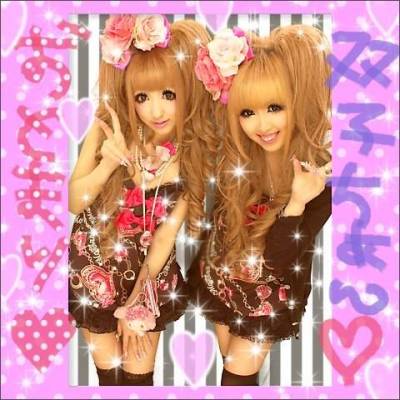
Homemade Purikura!。゚・⌒☆

Hello Cuties~

     I hope you guys are in a creative mood because today it's all about Purikura!  I found out some of my friends from work read my blog so, I'll briefly talk about Purikura.  (@^◡^)

     Purikura (プリクラ) is just a sticker photo booth in plain terms.  But it's so fun~  Same concept of the abandoned photo booths you might see in malls.  But in Japan they're super cute with tons of customization choices!  The print out is a sticker and you can download a digital version to your phone.  The most noticeable difference in their photo booths are the eye enlargement feature 👀 (lol). 



     I love these kinds of posts!  Something to get you in the mood to create fun things whether it's using physical material or digital.  I used to watch a lot of youtube videos back in the day about "kawaii apps" or photo editing apps.  I'd download them all!  (who remembers cocoppa?!)  So today I'm going to share how I create my own Purikura using my cellphone!


     Here are all of my photo editing apps~  For purikura I usually use Meitu and PicsArt.


     In Meitu, we're going to select "photo editing".  After picking a photo, scroll the menu at the bottom and click "mosaic".  There are tons of choices!


     Once you've chosen a mosaic background, you can control the pen size by the circles below your picture.  You can easily erase mistakes or just hit the undo button.  It undoes the last stroke.  


Get in those nooks and crannies girl! (lol)


* tadaaa~

     You can even double up with mosaic filters!  Which is what I did but this time only to my boots~ (lol).  I've done mosaic with my fingers before, but I tend to use a stylus for that neat look.

* ooo la la~

     Now we get to use "magic brush"!  There's plenty to choose from just like the backgrounds in mosaic.  You can adjust the size of the brush at the bottom.  There's no limit to how many you use either, so just have fun!  I used the white feathers, sparkles, paintbrush, and the sparklers brush.


     Make sure you save your masterpiece~  Now we'll open said picture in PicsArt!


     I like to use this app because it has a library of stickers that you can search!  The app can do so much more but it's the main thing I use it for.


     Like I said, toons of things you can use this app for, but let's scroll over to "sticker"!  Best part is there's a search bar so you can look for anything your heart desires.  This Gal loves her bling so I searched diamond.


     There's no limit to how many stickers you can add here either!! I ended up adding some butterflies too~  Pro-tip:  if you find a sticker you LOVE but you wish it were in another color?  No problem!  Just adjust the sticker after selecting it!  You can change the overall hue of the sticker or even change one aspect of the sticker.


Now that you're done with your creation, let's see that bad boi!

So what do you think ~?


     That was actually quite fun to make (lol)!  I hope reading this was just as entertaining.  If you use any of these apps I'd love to see your homemade Purikura!  Tag me in the caption on instagram~

~ Love you x Amiman ~

Sunday, June 24, 2018

Gal Lessons: Applying Falsies Tutorial

     What is this? An update!  Took me long enough, right?
   
 I apologize guys I've been pretty sidetracked as of recent.  However I'm always plotting and thinking of new looks to try.  SO, don't worry, I have things to look forward to hopefully very soon.  Last post I said I'd share the false eyelash tutorial so here it is~  I hope you enjoy it despite my shabby filming, lighting and overall setup lol. 

~ Love you! x Amiman ~

Wednesday, June 6, 2018

How to Apply Falsies (Gyaru tips 'n tricks)

     Hello Cuties~ I'm back with the second portion to the prior post!  Aren't you curious as to what I filmed?  It's been requested that I do a video on how I apply false eyelashes!  Now, as I mentioned in said video, I'm no professional but I thought I'd just give this a try.  I'm also not the best instructor but I really do hope you like the video!

     The purpose of the video and this post is to also demonstrate how to modify, stack and apply eyelashes and accent pieces.  I've always studied the tutorials in Egg, especially when they show how they stack lashes and share what brands they use.  So I've attempted to do the same thing here.

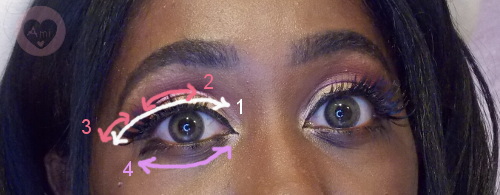
     Stacking lashes can be done in various ways.  Each number represents eyelash parts and the arrows depict where each part is placed on the eye.
     There's the basic method of stacking where you use two whole upper eyelashes and place them on top of each other.
     The next common method of stacking involves the addition of "snippets" or accent piece lashes either in the middle of the eye as shown here . . .
. . . or additions on the inner corner or outer corners of the eyes.  And lets not forget about the lower lashes!
     In my demonstration, I decided to use the second and third methods by adding accent pieces to the middle and outer eye.

-- MAP --
     Once I've uploaded the video, I will share it here on my blog.  I'm thinking the title will be along the lines of Gal Lessons:  Applying Lashes.  But how do you guys feel about making "Gal Lessons" a section here on Alice in Gyaruland?  Every so often I'll tackle "how to" videos and posts on skills that Gyaru use.  Sound like a good idea?
~ Love you! x Amiman~

Wednesday, July 30, 2014

The Process of Taobao!!

Taobao Tutorial~
I hope I do an okay job at explaining this process
:;(∩´﹏`∩);:

The shopping service I used was Taobaoring
The site looks kind of weird at the moment,
I guess they're remodeling it....
trust me when I used the site, it was perfectly fine and easy to follow!

1. Once you've made and account with Taobaoring,
you can browse taobao!
There's tons of things to buy!
If you don't have your mind set on anything specific before searching, check the taobao tag on tumblr to see what people are finding and buying ・ω・

2. Here's a few search terms I usually go for:

蝴蝶结连衣裙 - bow dress
牛仔背带裙 - denim strap dress (cute jumpers)
猫耳帽 - cat ear hat
iphone外壳香水 - iphone perfume case
日本睫毛 - false lashes
小恶魔ageha - gyaru style clothing (rokku, kuro, and some agejo)
http://lizbabe.taobao.com/ (shop with lots of agejo/Ma*rs and himekaji style)

But when in doubt,
fiddle around with google translate! that's what I do

3. After finding your desired items,
keep them in separate tabs or keep the links saved in a folder or somewhere.
Then on Taobaoring click the "quick order" tab
In the picture they show you what you should do with your links.
☺copy the link to the item you want
☺paste the link in the box under " *Item Link"
☺ press Get It !
☺ the page should bring up a picture of them item with places to make specific selections like "size", "color", and "quantity"
☺ there's also a spot to add comments about your order for the agents to see

4. I can't remember exactly how this part went at the moment, but,
once you've completed making your order
under the tab "Order List"
you can see statuses that the order will go through.
After making the order you must "await user confirm",
then once it's confirmed they'll await your first payment;
I opted for using paypal!
Once the first payment is made, the agents will start purchasing your items.
If in the case that any of the items are out of stock, they will let you know before you make payment.
After all the items have been purchased and have made it to their building, the people at taobaoring take photos of the items, which you can view under "order list".
After that, you make a second payment which is for shipping.
Then you wait for the package to be sent to you!
(I forgot to mention at some point while making your order, you get to choose which type of shipping you want to use.  I chose EMS; this came with a tracking number.)
♥

phew! well I hope that made sense ....
I'm afraid I'm not too great at explaining things
(*´-`*)
sorry if this was confusing~~